It’s clear that Karta GPS allows for offline navigation which can be a big plus if you are running low on available data, or if you find yourself in a place with bad data reception. However it’s also true that if you are offline all the time, you will be missing out on some great features.
Nearby Places
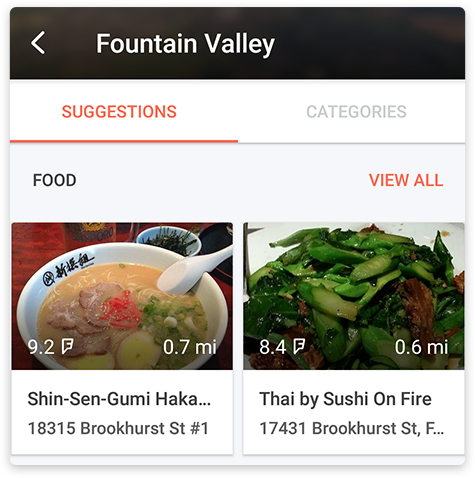
If you are connected to the internet, the button Nearby Places will appear when you tap Search on the main screen. Tapping it will give you the nearest suggestions, based on your current location. If you tap Nearby Places inside the Details screen of an address, a place or a person, you’ll get suggestions near the location you were just viewing.

Suggestions are divided into different sections, namely Food, Coffee, Drinks, Shopping, Fun, Sights, Travel and Hotels - tap View all to see more results of a specific section.
Traffic Information
Traffic is like a living entity constantly changing it’s course. With that in mind, be sure to turn on your data if you want your route suggestions and estimated times of arrival to reflect the current traffic conditions.
Karta GPS is offering 6 months of free traffic information valid from the date you installed the app for the first time. Traffic will always be active as long as you have an internet connection, but you can choose to make it visible on the map or hide it. On the Map, tap on the Traffic button  to enable it and tap again to disable it
  .
.
Voice Search
For voice searching just tap on the microphone icon  on the Search bar and speak out an address, category or name of the place you want to find. This feature needs a data connection.
Comments
0 comments
Article is closed for comments.